


Vue 3 supports multiple v-model bindings on a single component. In Vue 3.4+, the defineModel() macro is the cleanest way to handle them. For older versions, a useVModel composable does the same job with a bit more boilerplate. This article covers both approaches. You can find the full code example in this GitHub repository.
For this example, we will use a form with name and surname fields.
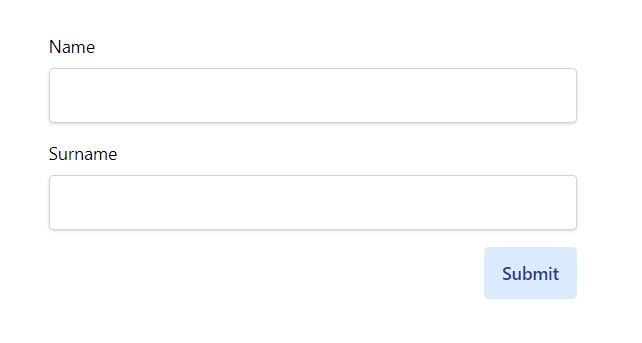
The parent component passes both values via v-model:name and v-model:surname:
App.vue
<template>
  <div :class="$style.container">
    <Form
      v-model:name="form.name"
      v-model:surname="form.surname"
      @submit="onSubmit"
    />
  </div>
</template>

<script setup>
import { ref } from 'vue'
import Form from './components/Form.vue'

const form = ref({
  name: '',
  surname: '',
})

const onSubmit = () => console.log(form)
</script>

<style module>
.container {
  max-width: 30rem;
  @apply mx-auto py-8;
}
</style>
defineModel(), Vue 3.4 and later
defineModel() is a compiler macro added in Vue 3.4. It declares a prop and the corresponding emit in one call, returning a writable computed ref you can bind directly with v-model.
components/Form.vue
<template>
  <form @submit.prevent="$emit('submit')">
    <div :class="$style.formBlock">
      <label :class="$style.label">Name</label>
      <input
        v-model="name"
        :class="$style.input"
        type="text"
        aria-label="Name input"
      />
    </div>
    <div :class="$style.formBlock">
      <label :class="$style.label">Surname</label>
      <input
        v-model="surname"
        :class="$style.input"
        type="text"
        aria-label="Surname input"
      />
    </div>
    <div>
      <button
        class="float-right bg-blue-100 text-blue-900 px-4 py-3 rounded font-semibold"
        type="submit"
      >
        Submit
      </button>
    </div>
  </form>
</template>

<script setup>
defineEmits(['submit'])

const name = defineModel('name')
const surname = defineModel('surname')
</script>

<style module>
.formBlock {
  @apply flex flex-col mb-4;
}
.label {
  @apply mb-2;
}
.input {
  @apply px-4 py-3 shadow rounded border border-gray-300 bg-white;
}
</style>
defineModel('name') handles everything: it declares name as a prop, registers the update:name emit, and returns a writable computed ref. When the input changes, the parent's state updates automatically. No manual emit calls, no computed getters and setters.
useVModel composable, Vue 3.0 to 3.3
If you are on a Vue version before 3.4, the useVModel composable gets the same result. To update the parent's state, the child needs to emit an update:<propName> event. The composable wraps that in a computed ref:
composables/useVModel.js
import { computed, getCurrentInstance } from 'vue'

export const useVModel = (props, propName) => {
  const vm = getCurrentInstance().proxy

  return computed({
    get() {
      return props[propName]
    },
    set(value) {
      vm.$emit(`update:${propName}`, value)
    },
  })
}
Pass props to keep reactivity intact, and the prop name you want to sync. Inside the composable, getCurrentInstance() gives access to $emit, so the setter can fire the right event. The getter returns the current prop value; the setter emits the update.
components/Form.vue (pre-3.4)
<template>
  <form @submit.prevent="$emit('submit')">
    <div :class="$style.formBlock">
      <label :class="$style.label">Name</label>
      <input
        v-model="nameState"
        :class="$style.input"
        type="text"
        aria-label="Name input"
      />
    </div>
    <div :class="$style.formBlock">
      <label :class="$style.label">Surname</label>
      <input
        v-model="surnameState"
        :class="$style.input"
        type="text"
        aria-label="Surname input"
      />
    </div>
    <div>
      <button
        class="float-right bg-blue-100 text-blue-900 px-4 py-3 rounded font-semibold"
        type="submit"
      >
        Submit
      </button>
    </div>
  </form>
</template>

<script>
import { useVModel } from '../composables/useVModel.js'
export default {
  emits: ['update:name', 'update:surname', 'submit'],
  props: {
    name: String,
    surname: String,
  },
  setup(props) {
    return {
      nameState: useVModel(props, 'name'),
      surnameState: useVModel(props, 'surname'),
    }
  },
}
</script>
@vueuse/core useVModel
If your project already uses @vueuse/core, it ships a useVModel composable that works the same way. You can skip writing your own:
<script setup>
import { useVModel } from '@vueuse/core'

const props = defineProps({
  name: String,
  surname: String,
})

defineEmits(['update:name', 'update:surname', 'submit'])

const nameState = useVModel(props, 'name')
const surnameState = useVModel(props, 'surname')
</script>
For new projects on Vue 3.4+, defineModel() is the right choice. The useVModel composable, whether custom or from VueUse, is still useful when upgrading an older codebase or when you need the extra options the VueUse version provides (like passive mode or custom event names).
Frequently asked questions
If you would like to learn more about Vue patterns and best practices, check out the Vue - The Road To Enterprise book.